Similar Posts

How to verify SonicWALL Email security current Firmware version
SonicWALL Email Security Current Firmware Version Login to SonicWALL Email security Control Center (CC) Click Manage Click Firmware Update

Safety tips in email messages Office 365
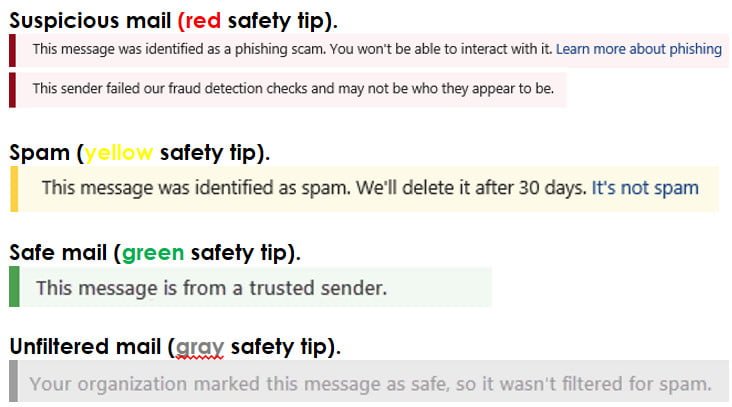
Safety tips in email messages Office 365 Exchange Online Protection (EOP) and Microsoft 365 protect you with spam, phishing, and malware prevention. Today, some of these attacks are so well crafted that they look legitimate. Sending messages to the Junk Email folder isn’t always enough. Now, when you check your email in Outlook or Outlook…
Protect against threats – Office 365
Protect against threats – Office 365 Microsoft 365 includes a variety of threat protection features. Here’s a quick-start guide you can use as a checklist to make sure your threat protection features are set up for your organization. Important Initial recommended settings are included for each kind of policy; however, many options are available, and…
IronPort SMTP Routes Overview
IronPort SMTP Routes Overview SMTP Routes allow you to redirect all email for a particular domain to a different mail exchange (MX) host. For example, you could make a mapping from example.com to groupware.example.com. This mapping causes any email with @example.com in the Envelope Recipient address to go instead to groupware.example.com. The system performs an…

How to Block list a Domain in Office 365
Steps to Block list a Domain in Office 365 Open https://outlook.office365.com/ecp/ Protection -> Spam filter -> Default -> Block lists ->Add the sender domain under Domain block list -> Ok ->Save
Spam-Control Mailbox for IronPort Customers
Uncaught spam submission Process: (How to report/submit spam emails to Ironport) What to do if spam gets through If spam gets through the filter and lands in your inbox, you should send it to IronPort uncaught spam submission mailbox. But don’t just click Forward. Instead, follow these four easy steps (for Microsoft Outlook users). Following…