Similar Posts
Spam-Control Mailbox for IronPort Customers
Uncaught spam submission Process: (How to report/submit spam emails to Ironport) What to do if spam gets through If spam gets through the filter and lands in your inbox, you should send it to IronPort uncaught spam submission mailbox. But don’t just click Forward. Instead, follow these four easy steps (for Microsoft Outlook users). Following…
IronPort SMTP Routes Overview
IronPort SMTP Routes Overview SMTP Routes allow you to redirect all email for a particular domain to a different mail exchange (MX) host. For example, you could make a mapping from example.com to groupware.example.com. This mapping causes any email with @example.com in the Envelope Recipient address to go instead to groupware.example.com. The system performs an…
Overview of Spam-Filtering Features
Overview of Spam-Filtering Features The spam-filtering functionality available on the Mailbox server role is not enabled by default. If you do not have an SMTP gateway, Exchange Edge Transport server, or online anti-spam solution, you should enable spam filtering in Exchange Server 2016. To enable and configure anti-spam filtering in Exchange 2016, you should use…

How to Block an IP in Office 365
Steps to Block an IP address in Office 365 Open https://outlook.office365.com/ecp/ Protection -> Connection filter -> Default -> Connection filtering ->Add the IP address under IP Block list -> Ok ->Save

Junk Email vs Bulk Email
What’s the difference between junk email and bulk email? What’s junk email? Junk email messages are “spam” messages, which are unsolicited (and typically unwanted) email messages that are filtered by the service. By default, the service rejects the spam message based on the reputation of the sending IP address. However, if it passes IP inspection…
Whitelist an e-mail address/domain in IronPort
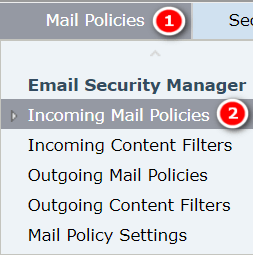
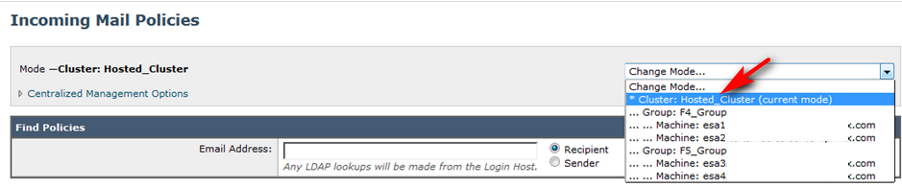
Steps to Whitelist an e-mail address/Domain in IronPort Log into IronPort ESA instances Go to Mail Policies -> Incoming Mail Policies. Change Mode to Hosted Cluster. Click on the Whitelisted Senders Policy. Add sender email addresses or domains, then save and then commit changes.