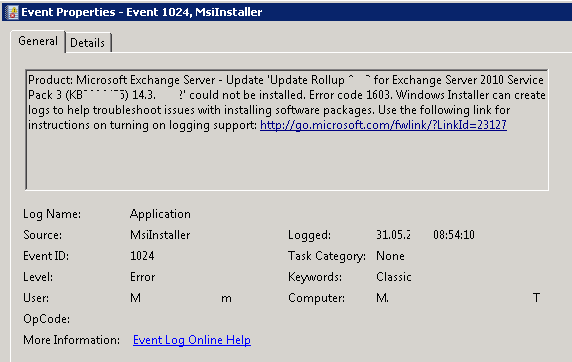
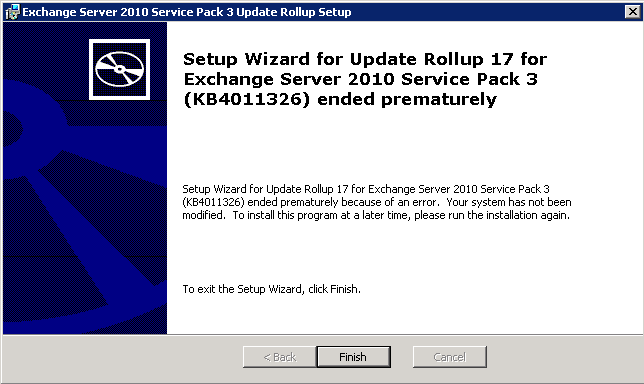
Unable to Install Rollup Update – Update Rollup for Exchange Server 2010 Service Pack 3 Could not be installed. Error code 1603

Encountering difficulties with installing Rollup Updates for Exchange Server 2010 Service Pack 3 is a common challenge for administrators. Error code 1603 can halt the installation process. In this blog post, we’ll show you how to fix this issue and get those updates installed smoothly.

Unable to Install Rollup Update – Exchange 2010
Solution:

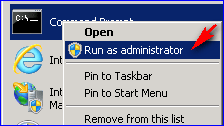
Open elevated Command Prompt (Run as Administrator)
Navigate to the RU Installer path

Run the below command: 

msiexec /update Exchange2010-KB4509410-x64-en.msp

Similar Posts

  • The Active Sync Device cannot be found

    Unable to delete Active Sync Devices in Exchange. Error: The Active Sync Device cannot be found. When you try to remove the mobile partnership in EMC(User Mailbox -> Right click -> Manage Mobile Phone -> Remove mobile phone partnership) you get the below error message: Solution: Open EMS Run following command: Get-ActivesyncDeviceStatistics –Mailbox “user alias”…

  • Edge Transport Server

    The Edge Transport server role is available from Exchange 2013 Service Pack 1. This server role is deployed in the perimeter network and outside the Active Directory forest. Edge Transport servers don’t have direct access to Active Directory for configuration and recipient information in the way Client Access or Mailbox servers do. The Edge Transport…

  • | |

    Message Tracking CMDlets

    Exchange Message Tracking PowerShell CMDlets Search by Message ID Get-ExchangeServer | get-messagetrackinglog -MessageID “<messageID>” -Start “5/16/2012 12:01:00 AM” -End “5/16/2012 11:59:00 PM” | fl Timestamp,ClientIp,ClientHostname,ServerIp,ServerHostname,Source,EventId,MessageId, @{Name=”Recipients”;Expression={$_.recipients}},@{Name=”Recipientstatus”;Expression={$_.recipientstatus}},TotalBytes,MessageSubject,Sender,ReturnPath,MessageLantency Search by Sender Get-ExchangeServer | get-messagetrackinglog -sender user@domain.com -Start “11/15/2012 12:00:00 AM” -End “11/16/2012 11:59:00 PM” | fl Timestamp,ClientIp,ClientHostname,ServerIp,ServerHostname, Source,EventId,MessageId, @{Name=”Recipients”;Expression={$_.recipients}},@{Name=”Recipientstatus”;Expression={$_.recipientstatus}},TotalBytes,MessageSubject,Sender Search by Recipient Get-ExchangeServer | get-messagetrackinglog -recipient user@domain.com…

  • |

    Introduction to Edge Transport Servers

    Introduction to Edge Transport Servers Exchange Server 2016 provides two types of roles, namely the Mailbox server and Edge Transport servers. Mailbox servers contain mailbox databases that process, render, and store data, the transport services that are used to route mail, the client access services that accept client connections for all protocols, and the Unified…

  • |

    Managing Groups CMDlets

    Managing Exchange Groups PowerShell CMDlets Get Distribution Group Get-DistributionGroup -identity ‘user@domain.com’ | fl Get Distribution Group Members and export to a text file Get-DistributionGroupMember -Identity ‘group@domain.com’ | ft name, primarysmtpaddress > c:\path\file.txt Get Distribution Group information Get-DistributionGroup -Identity ‘group@domain.com’ | fl DisplayName, Alias, PrimarySmtpAddress, EmailAddresses, RecipientType, HiddenFromAddressListsEnabled, LastExchangeChangedTime, LegacyExchangeDN, WhenChanged, WhenCreated, WhenChangedUTC, WhenCreatedUTC, AcceptMessagesOnlyFrom, AcceptMessagesOnlyFromDLMembers,…

Leave a Reply

Your email address will not be published. Required fields are marked *