The Active Sync Device cannot be found

Unable to delete Active Sync Devices in Exchange.

Error: The Active Sync Device cannot be found.

When you try to remove the mobile partnership in EMC(User Mailbox -> Right click -> Manage Mobile Phone -> Remove mobile phone partnership) you get the below error message:
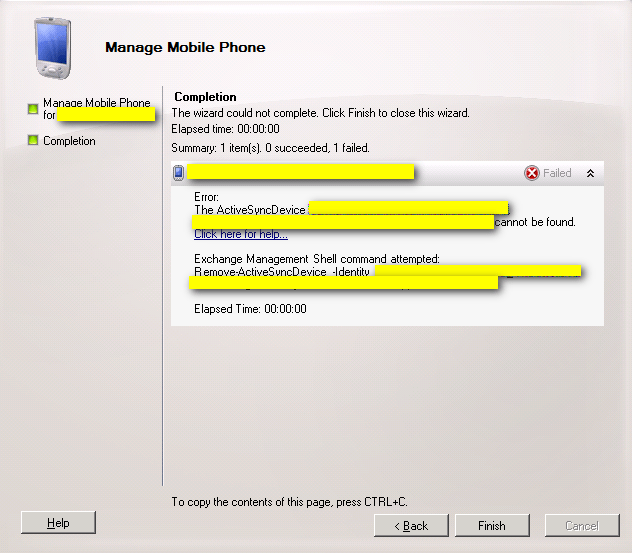
Solution:

  1. Open EMS
  2. Run following command: Get-ActivesyncDeviceStatistics –Mailbox “user alias”
  3. Copy the GUID of the device that needs to be removed
  4. Run below given command
  5. Remove-ActiveSyncDevice –Identity “GUID copied in Step 3

            Ex: Remove-ActiveSyncDevice –Identity “1140B5A5508D422741F2E87CE114E115”

Similar Posts

  • | | | |

    Resource Rooms and Calendars CMDlets

    Exchange Resource Rooms and Calendars PowerShell CMDlets Disable Double Booking of Meeting Rooms Set-CalendarProcessing -Identity ‘room’ -AllowConflicts:$false Disable Double Booking on all Meeting Rooms Get-Mailbox | where {$_.ResourceType -eq “Room” } | Set-CalendarProcessing -AllowConflicts:$false Get Status of Meeting Rooms Calendars Get-CalendarProcessing -Identity room | fl Get Calendar Permissions for user Get-MailboxFolderPermission roomname@domain.org:\calendar Grant read rights to…

  • | |

    Exchange File mode replication vs Block mode replication

    Exchange File mode replication vs Block mode replication Database replication occurs between DAG members using two methods: (1). File mode replication (2). Block mode replication (1). File mode replication: During file mode replication, each transaction log files generated by the active database copy is written until it is closed off when it reaches 1MB in…

  • Edge Transport Server

    The Edge Transport server role is available from Exchange 2013 Service Pack 1. This server role is deployed in the perimeter network and outside the Active Directory forest. Edge Transport servers don’t have direct access to Active Directory for configuration and recipient information in the way Client Access or Mailbox servers do. The Edge Transport…

  • | |

    Message Tracking CMDlets

    Exchange Message Tracking PowerShell CMDlets Search by Message ID Get-ExchangeServer | get-messagetrackinglog -MessageID “<messageID>” -Start “5/16/2012 12:01:00 AM” -End “5/16/2012 11:59:00 PM” | fl Timestamp,ClientIp,ClientHostname,ServerIp,ServerHostname,Source,EventId,MessageId, @{Name=”Recipients”;Expression={$_.recipients}},@{Name=”Recipientstatus”;Expression={$_.recipientstatus}},TotalBytes,MessageSubject,Sender,ReturnPath,MessageLantency Search by Sender Get-ExchangeServer | get-messagetrackinglog -sender user@domain.com -Start “11/15/2012 12:00:00 AM” -End “11/16/2012 11:59:00 PM” | fl Timestamp,ClientIp,ClientHostname,ServerIp,ServerHostname, Source,EventId,MessageId, @{Name=”Recipients”;Expression={$_.recipients}},@{Name=”Recipientstatus”;Expression={$_.recipientstatus}},TotalBytes,MessageSubject,Sender Search by Recipient Get-ExchangeServer | get-messagetrackinglog -recipient user@domain.com…

  • Exchange Mail Queue Management CMDlets

    Exchange Mail Queue Management PowerShell CMDlets Get Message Queue information Get-transportserver | Get-Queue –SortOrder: -MessageCount Get Queue Details Get-Queue –Server <server name> | Sort-Object -Property Messagecount | FT Identity, DeliveryType, NextHopDomain, Status, MessageCount, LastRetryTime, LastError -autosize Move Messages to Another Working Queue In the event a Hub Transport server is completely out, you may have the…

Leave a Reply

Your email address will not be published. Required fields are marked *